


Contact
Most asked
-
You can find certified FAZUA partners who can provide support for a service case and other inquiries in our Dealer Locator.
-
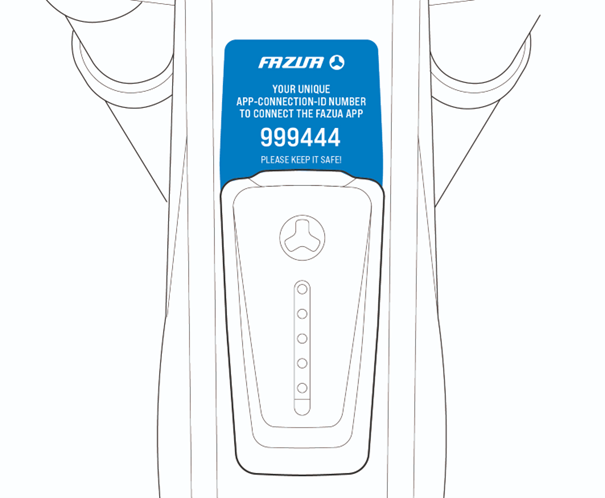
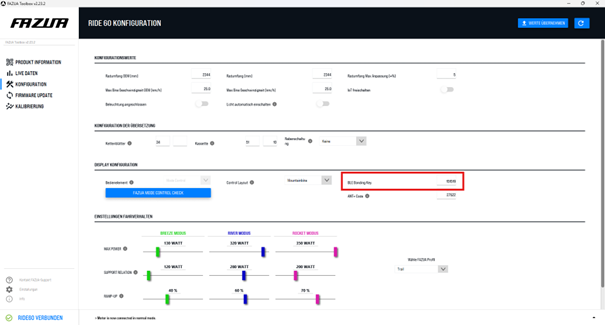
The Bluetooth bonding code (depending on your smartphone's operating system it might be called key or PIN) is a safety feature individual to each bike to make sure only authorized persons can connect the FAZUA app to your bike. You can easily find it in two locations:
- On a new bike there’s a blue label around the LED Hub or a blue label hanging off the cable to your control.
- Connect your bike to the Toolbox software, choose the “configuration” tab on the left side. You can see the Bluetooth bonding code there.
-
To perform the update, you need the e-bike with the battery inserted and a suitable USB-C cable. Only use a quality data cable. The update can be performed locally or online. We recommend the online update because you are automatically provided with the latest firmware! Make sure your computer is connected to the internet. You can find video instructions here.
- Connect the e-bike to your computer via the USB cable. The USB port on your bike can be found in the LED Hub or the Control Hub.
- Download the current FAZUA Toolbox Software and start it.
- Call up the "FIRMWARE UPDATE" tab and click on "RIDE 60 BUNDLE UPDATE".
- You can now choose between the online update and a local update. If you select "online", the latest firmware bundle will be downloaded automatically. Internet connection required! Components for which there is an updated firmware version are automatically selected for the update.
- Click on "Start". All selected components will now be updated.
- Wait until all updates have been installed completely and do not remove the USB cable or battery under any circumstances!
- After all updates have been successfully installed, you can remove the USB cable.
- Carefully close the USB port on your e-bike to prevent water and dirt from entering.
-
Starting with firmware bundle 12, a Ride 60 system calibrates itself automatically each time it is started and during the ride if needed. Nevertheless, manual calibration must be performed after working on the drive unit, chainring, and cranks to ensure proper functioning from the first meter ridden.
Regular calibration is important to ensure that the system can provide reliable and predictable assistance. Depending on the firmware installed, there are two different options for this:
- If Firmware Bundle 12 or higher is installed, calibration takes place automatically shortly after each system start. Three conditions must be met for this: a speed of at least 18 km/h and a cadence higher than 50 revolutions/minute for at least 8 seconds. These are conditions that should be met after a short time on practically any ride. The system then calibrates itself automatically.
- If the bike still has Firmware Bundle 11 or lower installed and there is no way to update the firmware to the latest version, or after work on the drive unit, chainring, or cranks, calibration must be performed manually in the Toolbox. To do this, hang the bike in a work stand so that the cranks and rear wheel can turn freely. Connect it to the Toolbox using a USB-C cable. Once connected, select the “Calibration” tab. There you will be guided through all the necessary steps.
Calibration checks whether the torque sensor is still measuring accurately. If necessary, adjustments are made to restore measurement accuracy. This is important because the torque sensor measures the power that the rider applies to the drive via the pedals. The more accurate and reliable this measurement is, the better the system can respond to this input. Over time, measurement results can be distorted by external influences such as impacts, which is why it is necessary to calibrate the torque sensor regularly.
-
Calibration is important to ensure that your system provides reliable and predictable assistance. It is recommended if the system provides irregular assistance or if other unusual riding behavior is observed.
The Ride 50 system can only be calibrated using the Toolbox software. To do this, place your bike in a work stand with the battery inserted so that the cranks and rear wheel can turn freely. Connect it to the Toolbox using a USB cable. Once connected, select the “Calibration” tab. You will then be guided through all the necessary steps.
Calibration checks whether the torque sensor is still measuring accurately. If necessary, adjustments are made to restore measurement accuracy. This is important because the torque sensor measures the power you put into the drive via the pedals. The more accurate and reliable this measurement is, the better the system can respond to your input. Over time, measurement results can be distorted by external influences such as impacts, which is why it is necessary to calibrate the torque sensor regularly.
-
When creating a system report, all functions of the e-bike are checked and the data is saved. This report forms the basis of every service request. To create it, you need a USB-C cable and the Toolbox software.
First, you must connect the Toolbox software to the e-bike using the USB-C cable. Once the connection is established, select the “Create system report” button in the “Product information” tab. After completing the process, you can name and save the system report individually.
-
All replacement parts that you can install yourself can be found in the FAZUA Shop. If you cannot find the replacement part you need there, it is only available through our network of FAZUA Certified Partners and must also be installed by a FAZUA Certified Partner. This ensures that sensitive components are installed correctly and that you can enjoy them for a long time. Contact the store where you purchased your bike or find a shop near you in our dealer locator.
If you have a service issue or need support from a dealer, you can find a certified FAZUA Partner here. If you would like to contact us directly, simply send us a message via the contact form.